Pin your song to the Pererin Wyf map
Step by step
First, upload your song to YouTube. If you do not have a YouTube account you can send your song to rowan@span-arts-dev.co.uk and we can add it to the map for you.
|
Go to the Pererin Wyf project page on the Span Arts website, and click ‘Click here to view the project map’.
|

| Click Continue to close the introduction. |  |
| Click Contribute at the top left corner of the map. Click to accept the Terms and Conditions, once you have read them. |
 |
| Sign in using either your Microsoft or Google account. |  |
| Drag the map to place the red target arrow at the location you want to pin your recording. |  |
| To zoom in or out you can use the + and – buttons at the top right corner of the map. |  |
|
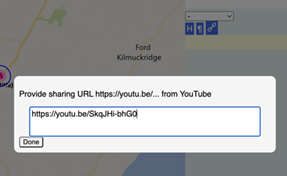
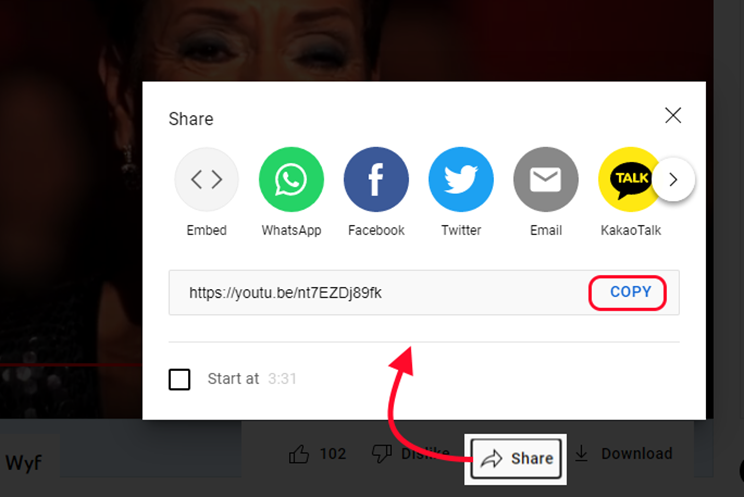
In another window or tab, copy the Share URL from your YouTube video.
|
| Back on the map, click the Add Video button in the top left portion of the screen. |  |
|
Paste the URL into the box. Click Done.
|
|
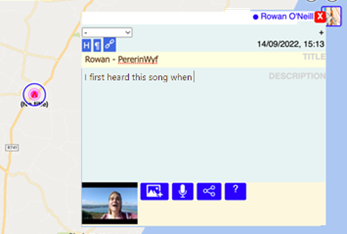
In the editing box, add more information about your recording. You can also add pictures. Click X at the top right corner to close the box.
|
|
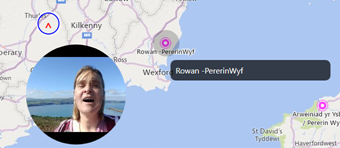
Your recording is now on the map. To see it, click the place, or tap two times.
|